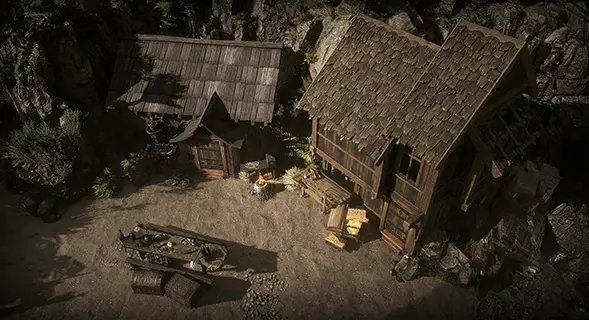
Complete Hostile Takeover in Act 4 to unlock Shoreline Hideout. Start with Ange in Kingsmarch, defeat Diamora in the Singing Caverns, then clear the Shoreline claim area and finish the quest. Afterward, select the Hideout from a waypoint or enter /hideout while in town. Four more layouts can be unlocked by finding and completing their claimable areas on the Atlas.
- Reach Act 4 and Kingsmarch.
- Speak to Ange to begin Hostile Takeover.
- For Atlas Hideouts, reach endgame and carry a Waystone that can open the revealed claimable area.
Speak to Ange in Kingsmarch during Act 4 to begin Hostile Takeover. This is the normal gameplay route to the first Hideout, Shoreline Hideout.
- Reach Kingsmarch in Act 4.
- Speak to Ange.
- Track Hostile Takeover in the quest list.
NPCThe Act 4 contact who starts and advances Hostile Takeover.
QuestRead every objective, contact, area, and reward.
Travel to Whakapanu Island, enter the Singing Caverns, and defeat Diamora, Song of Death. Return to Ange when the quest directs you to continue toward the Shoreline claim area.
- Reach Whakapanu Island.
- Enter the Singing Caverns.
- Defeat Diamora, Song of Death and return to Ange.
AreaArea layout, encounters, connections, and quests.
BossBoss mechanics, location, and quest involvement.
Travel with Ange to Shoreline Hideout and clear every monster from the claimable area. Speak to Ange again, enter the unlocked Hideout, and finish Hostile Takeover from inside it.
- Clear the entire claimable area rather than leaving after the first pack.
- Speak to Ange after the area is safe.
- Enter the Hideout and finish the quest.
AreaExact claim steps, area identifiers, image, and sources.
QuestCheck the current quest state if the claim does not complete.
Select the Hideout from the waypoint World Interface, or enter /hideout in chat while standing in a town. When more than one layout is unlocked, use Select Hideout in the Hideout menu or speak to Alva inside a Hideout to choose another unlocked layout.
- Use the Hideout entry in the waypoint interface.
- Use /hideout only while in a town.
- Choose only from layouts already unlocked in the current league.
DirectoryCompare every gameplay-unlockable layout.
NPCHideout layout selection and other services.
Reveal a Hideout node on the Atlas, open its claimable area with a Waystone, and complete the area. Canal, Felled, Limestone, and Shrine Hideout are separate unlocks, so completing one does not award the other three.
- Reveal the Hideout on the Atlas.
- Open the claimable area with a Waystone.
- Complete each layout once to add it to the selection.
AreaFind Canal Hideout on the Atlas, open it with a Waystone, and complete the claimable map area.
AreaFind Felled Hideout on the Atlas, open it with a Waystone, and complete the claimable map area.
AreaFind Limestone Hideout on the Atlas, open it with a Waystone, and complete the claimable map area.
AreaFind Shrine Hideout on the Atlas, open it with a Waystone, and complete the claimable map area.
Hideout unlocks are league-specificAfter one Hideout is unlocked, other characters in that league can use it after reaching Clearfell Encampment. A different league has separate progression.
The Map Device has a separate progression requirementOwning a Hideout does not immediately make its Map Device usable. The Map Device becomes available after reaching endgame for the first time in that league.
Shop Hideouts are not Atlas unlocksPurchased and supporter-pack layouts use a different acquisition method. This guide covers the campaign and Atlas layouts earned through gameplay.
DirectoryCompare every gameplay-unlockable layout.
AreaExact claim steps, area identifiers, image, and sources.
QuestCheck the current quest state if the claim does not complete.
NPCThe Act 4 contact who starts and advances Hostile Takeover.
NPCHideout layout selection and other services.
DirectoryAtlas maps and endgame progression.
MechanicHow to obtain and sustain the items used to enter Atlas areas.
AreaArea layout, encounters, connections, and quests.
BossBoss mechanics, location, and quest involvement.
AreaFind Canal Hideout on the Atlas, open it with a Waystone, and complete the claimable map area.
AreaFind Felled Hideout on the Atlas, open it with a Waystone, and complete the claimable map area.
AreaFind Limestone Hideout on the Atlas, open it with a Waystone, and complete the claimable map area.
AreaFind Shrine Hideout on the Atlas, open it with a Waystone, and complete the claimable map area.