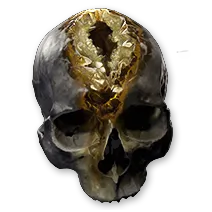
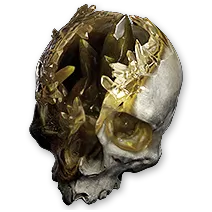
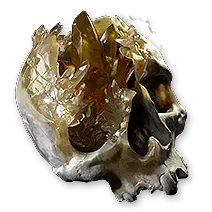
Characters start with 0 Spirit. Use the Gembloom Skull from The King in the Mists for 30 Spirit, the Gemrot Skull from Ignagduk for 30, and the Gemcrust Skull from Lythara for 40, giving 100 permanent maximum Spirit. Sceptres, equipment modifiers, Unique items, Augments, passive skills, and Ascendancy passives can add more. Persistent Skills reserve Spirit while enabled, and reservation can change between weapon sets.
- Open the Skills Panel and note maximum, reserved, and available Spirit.
- Check whether the character has used each of the three campaign Spirit reward items.
- Check the active weapon set before comparing Spirit totals.
Defeat The King in the Mists in Freythorn and use the Gembloom Skull for 30 Spirit. Defeat Ignagduk, the Bog Witch in The Azak Bog and use the Gemrot Skull for another 30. Defeat Lythara, the Wayward Spear in Kriar Village and use the Gemcrust Skull for 40. The reward item must be used after it drops; merely defeating the boss does not apply the permanent bonus.
- Act 1 total includes the 30 Spirit Gembloom Skull.
- Act 3 total includes the 30 Spirit Gemrot Skull.
- Interlude 3 total includes the 40 Spirit Gemcrust Skull.
Quest ItemPermanent 30 Spirit reward from The King in the Mists.
Quest ItemPermanent 30 Spirit reward from Ignagduk.
Quest ItemPermanent 40 Spirit reward from Lythara.
GuideTrack these Spirit rewards with every other permanent campaign bonus.
Sceptres grant a base amount of Spirit and can roll increased Spirit. Body Armour and Amulets can roll flat Spirit, while specific Unique items and socketed Augments can add more. Compare the final Spirit total shown with the intended weapon set active because swapping away from a Sceptre or another Spirit source recalculates the available amount.
- Check the Sceptre's base Spirit and increased Spirit modifier separately.
- Search Body Armour and Amulet modifiers for flat Spirit.
- Confirm that every Augment is socketed into an eligible item type.
DirectoryCompare every Sceptre base and its granted Spirit.
DirectoryFind bases and modifiers that can supply flat Spirit.
DirectoryFind Amulet bases, modifiers, and Unique Spirit sources.
Soul CoreA socketable source of Spirit on weapons.
DirectoryCheck exact Spirit modifier tiers and item-level requirements.
Add the reservation of every enabled Persistent Skill and every Support that adds a Spirit reservation. The total must fit inside the maximum Spirit available in that weapon set. Reservation Efficiency reduces the amount reserved without increasing maximum Spirit, so treat those as different values when comparing upgrades.
- Include Spirit added by Support Gems.
- Apply Reservation Efficiency to the reservation, not the maximum.
- Leave enough available Spirit for every Persistent Skill assigned to the set.
MechanicCompare permanent sources, reservation rules, and weapon-set behavior.
MechanicUnderstand reserved resources and Reservation Efficiency.
DirectoryCheck Supports that add a Spirit reservation.
Persistent Skills are toggled in the Skills Panel. Assign each one to the weapon set or sets where it should remain active, then enable it while that set has enough Spirit. A set can have a different maximum and different reservations because its equipment, passives, and enabled Persistent Skills can differ.
- Assign the Persistent Skill to the intended set.
- Enable the Skill after changing its Supports.
- Swap sets once and verify that the expected skills remain active.
GuideAssign Skills and passives to each set and test automatic swapping.
GuideEngrave and upgrade Persistent Skill Gems correctly.
DirectoryCheck the exact reservation and requirements of each Persistent Skill.
If the character shows 0 Spirit, first confirm that a campaign reward item was picked up and used or equip a valid Spirit source. If a Persistent Skill disables after a swap, compare the active set's equipment and passives, remove reservation Supports temporarily, and confirm the Skill is assigned to that set. Adding an empty Support socket does not reserve Spirit by itself; a Support with an added reservation does.
- Use unconsumed campaign reward items from the inventory.
- Compare Spirit before and after swapping weapon sets.
- Remove added-reservation Supports one at a time.
MechanicReview the exact maximum, reservation, and weapon-set rules.
GuideSeparate adding a socket from adding a reservation Support.
GuideFind any campaign Spirit reward the character missed.
Boss kills do not apply Spirit automaticallyPick up and use the Gembloom Skull, Gemrot Skull, or Gemcrust Skull after the corresponding boss kill.
Available Spirit can change on weapon swapEquipment, passives, and active Persistent Skills can differ between sets, so a valid setup in one set may not fit in the other.
Reservation Efficiency is not maximum SpiritIt lets the same maximum support more reservations but does not add to the maximum value.
MechanicReview the exact maximum, reservation, and weapon-set rules.
GuideFind any campaign Spirit reward the character missed.
GuideAssign Skills and passives to each set and test automatic swapping.
DirectoryCompare every Sceptre base and its granted Spirit.
Quest ItemPermanent 30 Spirit reward from The King in the Mists.
Quest ItemPermanent 30 Spirit reward from Ignagduk.
Quest ItemPermanent 40 Spirit reward from Lythara.
Soul CoreA socketable source of Spirit on weapons.
DirectoryFind bases and modifiers that can supply flat Spirit.
DirectoryFind Amulet bases, modifiers, and Unique Spirit sources.
DirectoryCheck exact Spirit modifier tiers and item-level requirements.
MechanicUnderstand reserved resources and Reservation Efficiency.
DirectoryCheck Supports that add a Spirit reservation.
GuideEngrave and upgrade Persistent Skill Gems correctly.
DirectoryCheck the exact reservation and requirements of each Persistent Skill.
GuideSeparate adding a socket from adding a reservation Support.